Push Buttons - [Learn & Grow]
What are Push Buttons?
A push button is a simple mechanical switch that connects or disconnects an electrical circuit when pressed. Push buttons are fundamental input devices in electronics, allowing users to control circuits manually.
Push buttons come in various forms and are used in everything from calculators to industrial control panels. They provide tactile feedback and are designed for momentary operation.
Push Button Types
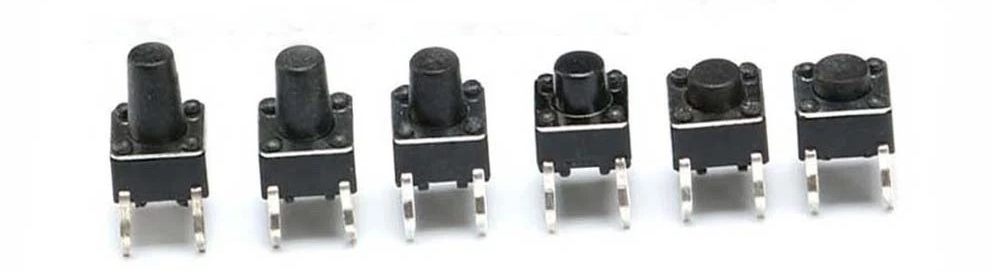
Normally Open (NO) Push Buttons
Normally Open buttons have contacts that are open (disconnected) in their resting state. When pressed, the contacts close, completing the circuit.
- Resting state: Circuit is open, no current flows
- Pressed state: Circuit is closed, current flows
- Common use: Starting devices, triggering actions
- Symbol: Circle with gap
Normally Closed (NC) Push Buttons
Normally Closed buttons have contacts that are closed (connected) in their resting state. When pressed, the contacts open, breaking the circuit.
- Resting state: Circuit is closed, current flows
- Pressed state: Circuit is open, no current flows
- Common use: Emergency stops, safety switches
- Symbol: Circle with connecting line
Push Buttons with LEDs
Many push buttons include built-in LEDs for visual feedback:
LED Indicator Types
- Always-On LED: LED lights when button is not pressed (for visibility)
- Press-Activated LED: LED lights only when button is pressed
- Status LED: Indicates system status, separate from button function
LED Colors and Meanings
- Red: Power, stop, emergency
- Green: Go, start, normal operation
- Yellow/Amber: Warning, caution
- Blue: Information, special functions
- White: General illumination
Push Button Configurations
Momentary vs Latching
- Momentary: Returns to original state when released
- Latching: Stays in pressed state until pressed again (like a light switch)
Contact Arrangements
- SPST (Single Pole Single Throw): One circuit, two positions
- SPDT (Single Pole Double Throw): One circuit, three positions
- DPST (Double Pole Single Throw): Two circuits, two positions
- DPDT (Double Pole Double Throw): Two circuits, three positions
How Push Buttons Work
Push buttons use a spring-loaded mechanism:
- Plunger: The part you press
- Spring: Returns button to resting position
- Contacts: Metal pieces that make/break connection
- Housing: Protects internal components
When pressed, the plunger compresses the spring and moves the contacts together (NO) or apart (NC).
Push Button Specifications
Electrical Ratings
- Voltage Rating: Maximum voltage the button can handle
- Current Rating: Maximum current through the contacts
- Power Rating: Maximum power dissipation
Mechanical Ratings
- Operating Force: How hard to press (typically 1-5N)
- Travel Distance: How far the button moves
- Life Expectancy: Number of operations before failure (10,000 - 1,000,000 cycles)
Push Button Applications
Consumer Electronics
- Keyboard keys
- Remote controls
- Game controllers
- Calculator buttons
Industrial Control
- Control panels
- Emergency stop buttons
- Start/stop switches
- Mode selectors
Automotive
- Horn buttons
- Window controls
- Seat adjustments
- Dashboard controls
Medical Devices
- Infusion pumps
- Diagnostic equipment
- Patient monitors
Push Button with LED Circuit Examples
Simple LED Button Circuit
A basic circuit using a NO push button with an LED:
VCC ----[RESISTOR]----[LED]----[BUTTON]----GND
When button is pressed, LED lights up.
Toggle Function with LED
Using a microcontroller to create a toggle function with LED feedback.
Debouncing
Push buttons can "bounce" (rapid on/off transitions) when pressed. Debouncing techniques:
- Hardware Debouncing: Using capacitors and resistors
- Software Debouncing: Using timers in code
- Schmitt Trigger: Using hysteresis
Assembly Tips
- Check pinout before soldering
- Use appropriate current limiting for LEDs
- Consider debouncing for digital circuits
- Ensure proper mounting for mechanical stability
- Test functionality after assembly
Common Push Button Issues
- Contact Bounce: False multiple presses
- Contact Wear: Reduced reliability over time
- Stuck Contacts: Due to dirt or mechanical failure
- Wrong Polarity: For buttons with LEDs
Next Steps
Ready to assemble? Return to Assembly Guide